Coordinate Systems
BlobBoards uses three types of coordinate specifications. Understanding them is essential for correctly extracting and using blob positions.
| Type | Values | Purpose |
|---|---|---|
| Image Origin | :colmap, :opencv, :julia | Pixel coordinate convention |
| Reference Frame | :pattern, :board, :canvas | Spatial origin on boards |
| Coordinate System | :pixel, :physical, :world | Unit system for transforms |
Image Origins
Different software uses different conventions for where the "first pixel" is located. BlobBoards stores coordinates internally in :colmap convention.
| Origin | First Pixel Center | Common Usage |
|---|---|---|
:colmap | (0.5, 0.5) | COLMAP, SfM tools, BlobBoards internal |
:opencv | (0, 0) | OpenCV, Python, NumPy |
:julia | (1, 1) | Julia arrays, MATLAB |
Visual Representation
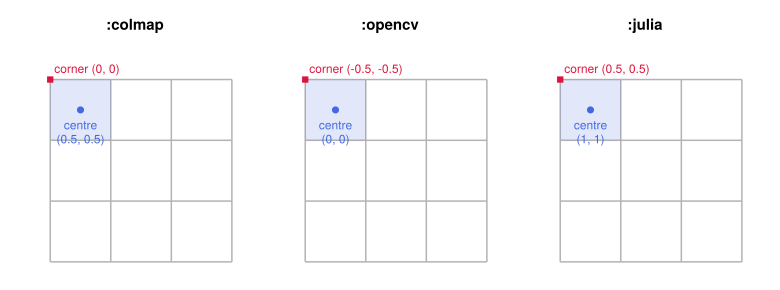
Converting Between Image Origins
The conversion is a EuclideanMap between PixelFrames, the map the figure above is drawn with. It acts on plain pixel coordinates, so strip the unit first:
using BlobBoardsusing BlobBoards: EuclideanMap, PixelFrame, centroid, ustrip # not exportedb = blobs(bundle, :pattern; density = 300dpi) # always in the :colmap conventionto_opencv = EuclideanMap(PixelFrame{:colmap}, PixelFrame{:opencv})centres_opencv = [to_opencv(ustrip.(px, centroid(d))) for d in b] # each centre shifted by (-0.5, -0.5)to_julia = EuclideanMap(PixelFrame{:colmap}, PixelFrame{:julia}) # shifted by (+0.5, +0.5)Reference Frames
For calibration boards, three nested reference frames define where the coordinate origin is located.
| Frame | Origin Location | Use Case |
|---|---|---|
:pattern | Top-left of pattern area | Blob detection, feature matching |
:board | Top-left of board (includes frame) | Full board image processing |
:canvas | Top-left of page (includes margins) | Page layout, printing |
Layout Diagram
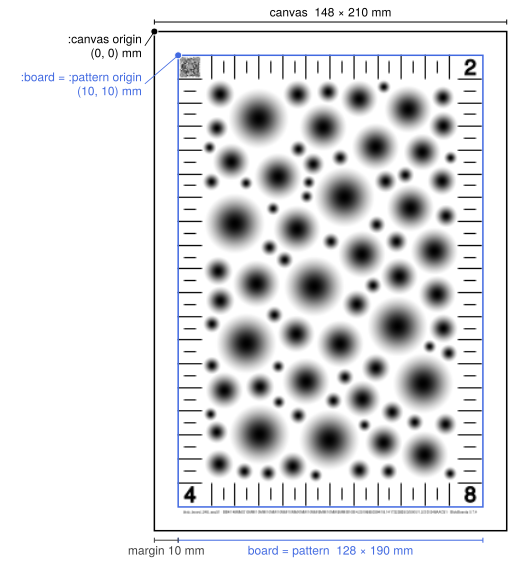
On a board made today the pattern IS the board: the frame's marks — corner cells and ruler bands — are reserved areas on it, which placement keeps clear of, so :pattern and :board share an origin, as the figure shows. A stored v3 board keeps its pattern inset inside a frame, and its :pattern origin lies inside its :board one.
Converting Between Reference Frames
bundle, _ = BlobBoards.load(BlobBoards.BoardBundle, "blob_board.json")# Get Translation between frames (in the board's stored unit: points on a v4# board, pixels on a stored v3 board)T = BlobBoards.Translation(board_config(bundle), :pattern, :board)board_point = T(pattern_point)# Or extract blobs directly in desired frameb_pattern = blobs(bundle, :pattern; units = mm)b_canvas = blobs(bundle, :canvas; units = mm)Coordinate Values Example
For a blob at pattern coordinates (80mm, 120mm) on an A4 board with the default 10 mm margin:
| Frame | Blob Center |
|---|---|
:pattern | (80mm, 120mm) |
:board | (80mm, 120mm) (the pattern is the board) |
:canvas | (90mm, 130mm) (the margin) |
Coordinate Systems
For transforms between pixel and physical units, use :pixel, :physical, and :world:
| System | Units | Description |
|---|---|---|
:pixel | px | Pixel coordinates at density, the density of the pixels you ask for (and pixel_frame) |
:physical | mm | Physical coordinates, y down, origin at the canvas top-left |
:world | unitless mm | Origin at the canvas centre, y-axis up |
Pixel to Physical Transform
bundle, _ = BlobBoards.load(BlobBoards.BoardBundle, "blob_board.json")# Get affine transform from pixels (of a 300 dpi image of the board) to mmH = BlobBoards.AffineMap(bundle, :pixel, :physical; pixel_frame=:julia, density=300dpi)# Transform a pixel point to physical coordinatesphysical_pt = H(Point2(100.0, 200.0))Pixel to World Transform
# Direct transform from pixels to world frameH = BlobBoards.AffineMap(bundle, :pixel, :world; pixel_frame=:opencv, density=300dpi)world_pt = H(Point2(100.0, 200.0))Blob Extraction
Unified API
The blobs function takes a reference frame (positional) and optional units:
bundle, _ = BlobBoards.load(BlobBoards.BoardBundle, "blob_board.json")# Pixel units (default) in pattern frame, at the density of the image they are# in (a stored v3 board's own by default; required for a v4 board)b = blobs(bundle, :pattern; density = 300dpi)# Pixel units in canvas frame (the page of a 300 dpi conversion)b = blobs(bundle, :canvas; density = 300dpi)# Physical unitsb = blobs(bundle, :pattern; units=mm)b = blobs(bundle, :canvas; units=inch)World Coordinates
For 3D calibration (centered origin, y-up, mm):
b = blobs(bundle, :world)# origin at the canvas centre (the board's, for a centred board)# x-axis right, y-axis up# units: mm (stripped to Float64)# Lift to 3D points on z=0 planeusing GeometryBasics: Point3X = Point3.(vcat.(BlobBoards.centroid.(b), 0.0))Bounding Rectangles
Get rectangles for different regions:
using GeometryBasics: Rectbundle, _ = BlobBoards.load(BlobBoards.BoardBundle, "blob_board.json")# Pattern bounds (origin at 0,0)rect = Rect(bundle, :pattern)# Board bounds (in pattern coords: the same rectangle on a board made today;# (-f, -f), its band's width, at its origin on a stored v3 board)rect = Rect(bundle, :board)Common Workflows
Feature Detection Pipeline
using BlobBoards: EuclideanMap, PixelFrame, centroid, ustrip # not exportedbundle, image = BlobBoards.load(BlobBoards.BoardBundle, "blob_board.json")# Ground truth at the image's density, as OpenCV-convention centres (an# external detector's convention)gt = blobs(bundle, :canvas; density = 300dpi)to_opencv = EuclideanMap(PixelFrame{:colmap}, PixelFrame{:opencv})gt_opencv = [to_opencv(ustrip.(px, centroid(d))) for d in gt]# then match your detector's output against gt_opencv with your own matcherCamera Calibration
using BlobBoards: centroid # not exportedbundle, image = BlobBoards.load(BlobBoards.BoardBundle, "blob_board.json")# 3D points (world frame, z = 0)b = blobs(bundle, :world)X = BlobBoards.Point3.(vcat.(BlobBoards.centroid.(b), 0.0))# The 2D image points and the pose come from your own detection and solver# (BlobBoards' own pipeline does both: find_boards, Detecting Boards).Unit Conversions
Convert between physical units and pixels:
using BlobBoards # re-exports mm, px, dpiusing VisualGeometryToolkitCore: uconvert, ustripusing GeometryBasics: Point2bundle, _ = BlobBoards.load(BlobBoards.BoardBundle, "blob_board.json")# A board's layout has no density: pixels are those of a conversion at one you namedensity = 300dpi# A density's own conversions (FlexUnits)scale = ustrip(px / mm, density) # pixels per mmpitch = inv(density) # the pixel pitch, a length per pixel# Physical to pixelsphysical_point = Point2(10.0mm, 20.0mm)pixel_point = uconvert.(px, physical_point .* density)# Pixels to physicalpixel_point = Point2(100.0px, 200.0px)physical_point = uconvert.(mm, pixel_point ./ density)Summary Table
| What | Keyword/Argument | Values | Default |
|---|---|---|---|
| Pixel convention | pixel_frame (keyword) | :colmap, :opencv, :julia | :colmap (internal) |
| Spatial origin | reference frame (positional) | :pattern, :board, :canvas | required |
| Unit system | units (keyword) | px, mm, inch, etc. | px |
| Pixel density | density (keyword of blobs and AffineMap) | e.g. 300dpi | required for a board with units = px: a board has no density of its own |